 Gridbinder
Guide · Format and print
KDP margins, gutter and bleed for puzzle books
A puzzle grid that runs into the binding is a layout problem readers notice at once, and an interior that breaks KDP's margin rules is sent back before it is printed. Here are the numbers KDP publishes, and how to use them for grids.
Updated 29 October 2026 · Examples are real, unedited pages from the Gridbinder studio unless the caption says otherwise.
The inside margin grows with the page count
A paperback is glued at the spine, so part of every page disappears into the binding. The thicker the book, the more it curves near the spine, which is why KDP asks for a wider inside margin as the page count goes up.
| Page count | Inside (gutter) | Outside, no bleed | Outside, with bleed |
|---|---|---|---|
| 24 to 150 | 0.375 in (9.6 mm) | at least 0.25 in (6.4 mm) | at least 0.375 in (9.6 mm) |
| 151 to 300 | 0.5 in (12.7 mm) | at least 0.25 in | at least 0.375 in |
| 301 to 500 | 0.625 in (15.9 mm) | at least 0.25 in | at least 0.375 in |
| 501 to 700 | 0.75 in (19.1 mm) | at least 0.25 in | at least 0.375 in |
| 701 to 828 | 0.875 in (22.3 mm) | at least 0.25 in | at least 0.375 in |
"Outside" here means the outer edge, the top and the bottom of the page. They do not have to be equal; they only have to be at least the minimum.
What the minimum looks like on a real page
The page below is a right-hand page from a 68-page, 6 x 9 in book made in Gridbinder, so the binding is on the left. The dashed lines show KDP's minimum margins for that page count. Nothing may be printed between a dashed line and the edge of the page.
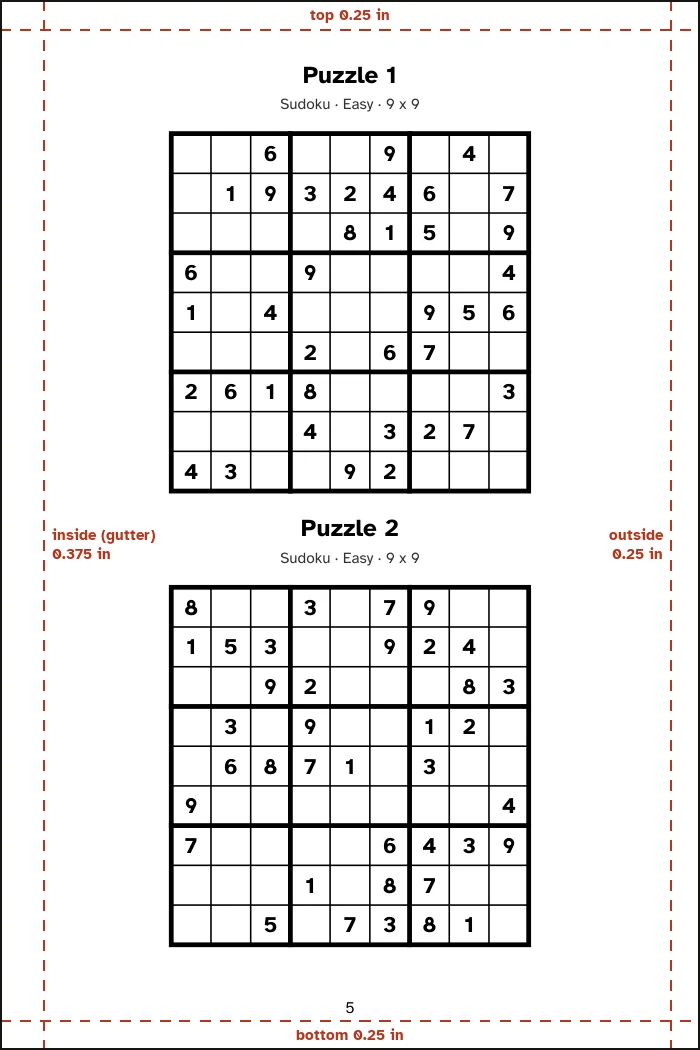
Notice how much room there is between the grids and the dashed lines. That is deliberate. A reader holds a puzzle book open with one hand and writes with the other, and the first column of a grid near the gutter is the one that gets hard to reach.
Left and right pages swap the gutter
On a right-hand (odd) page the binding is on the left; on a left-hand (even) page it is on the right. If your layout program uses "inside" and "outside" margins with mirrored pages, it handles this for you. If it only has left and right margins, a common workaround is to use the inside margin on both sides. That wastes a little space but can never put a grid into the binding.
Bleed: when a puzzle book needs it
Bleed means something is printed right up to the edge of the page, such as a coloured background or a photo. KDP trims the page after printing, so those elements must extend 0.125 in beyond the trim. Puzzle grids, word lists and answer keys sit inside the margins, so most puzzle books are set up without bleed.
If one page has bleed, the whole file must be set up with bleed. The page size then grows by 0.125 in in width and 0.25 in in height: a 6 x 9 in book becomes 6.125 x 9.25 in, and an 8.5 x 11 in book becomes 8.625 x 11.25 in. The outside margins also grow to at least 0.375 in.
A frequent cause of the "insufficient bleed" or "content outside margins" message is a PDF exported with a page size that matches neither the trim size nor the trim size plus bleed. Check the page size of your PDF before you upload.
Margins for puzzle pages in practice
- Plan the margin for the final page count. Answer keys and notes pages add pages, and crossing 150 or 300 pages moves you into the next margin band.
- Add room beyond the minimum on the inside. A good rule is an extra eighth of an inch.
- Keep page numbers inside the margin too. They count as content.
- Leave space under each grid for the puzzle number and level, so readers can find the answer.
- After upload, look at every page in KDP's print previewer. It flags text and images that fall outside the margins.
How Gridbinder sets the margins
The studio lays the book out once, counts the pages, and lays it out again with the inside margin for that page count plus an eighth of an inch. Top and outside margins are half an inch and page numbers sit 0.3 in from the bottom edge. The page is the trim size (6 x 9, 8 x 10, 8.5 x 11 in or A4) with no bleed. When the book is ready, the studio shows the page count and the inside margin it used. You can see this on your own settings with the free sample.
Questions
What is the gutter on KDP?
The gutter is the inside margin, next to the spine. KDP sets it by page count, from 0.375 in for books of up to 150 pages to 0.875 in for books of 701 to 828 pages.
Do the top and bottom margins have to be the same?
No. KDP only sets a minimum for the outside, top and bottom margins: 0.25 in without bleed and 0.375 in with bleed. They can differ from each other.
Does my puzzle book need bleed?
Only if something is printed to the edge of the page, such as a background colour. Puzzle grids normally sit inside the margins, so most puzzle books do not need bleed.
Which page count decides the margin, before or after the answer key?
The final page count of the whole PDF, including the title page, answer key and any notes pages. If you add pages later, check whether you crossed into the next band.
Sources
- KDP: Set trim size, bleed and margins, checked 29 October 2026
- KDP: Paperback submission guidelines, checked 29 October 2026
KDP changes its rules from time to time. If a number here and the KDP help page disagree, the KDP page wins; please tell us at support@arling.sk.