 Gridbinder
Guide · Format and print
Spine width and cover size for a puzzle book
You cannot design the cover until you know the page count, because the spine width comes from it. Here is the formula KDP uses, worked through for real puzzle book sizes.
Updated 29 October 2026 · Examples are real, unedited pages from the Gridbinder studio unless the caption says otherwise.
Step 1: get the final page count
Count every page of the interior PDF: title page, copyright page, how-to pages, puzzles, answer key, any notes pages. If the count is odd, KDP rounds it up to the next even number, so use that.
In Gridbinder the page count is shown under the download button when the book is ready. As an example, 150 Sudoku puzzles at 6 x 9 in, two per page, with an answer key and Verification report, came to 109 pages in our test. KDP counts that as 110.
Step 2: work out the spine
| Ink and paper | Per page | 100 pages | 200 pages | 300 pages |
|---|---|---|---|---|
| Black ink, white paper | 0.002252 in | 0.2252 in | 0.4504 in | 0.6756 in |
| Black ink, cream paper | 0.0025 in | 0.25 in | 0.5 in | 0.75 in |
| Standard colour, white | 0.002252 in | 0.2252 in | 0.4504 in | 0.6756 in |
| Premium colour, white | 0.002347 in | 0.2347 in | 0.4694 in | 0.7041 in |
One KDP page lists a single figure of 0.002347 in for "color paper". The cover page lists 0.002252 in for standard colour. If you print in standard colour, check the number in KDP's own cover calculator.
Step 3: work out the full cover
A paperback cover is one image that wraps around the book: back cover on the left, spine in the middle, front cover on the right, plus 0.125 in of bleed on every outer edge that is trimmed off after printing.
Example 1: 6 x 9 in, 110 pages, white paper. Spine 110 x 0.002252 = 0.2477 in. Width 0.125 + 6 + 0.2477 + 6 + 0.125 = 12.4977 in. Height 9 + 0.25 = 9.25 in. At 300 DPI that is about 3750 x 2775 pixels.
Example 2: 8.5 x 11 in large print Sudoku, 132 pages (100 puzzles, one per page, with answer key, in our test), white paper. Spine 132 x 0.002252 = 0.2973 in. Width 0.125 + 8.5 + 0.2973 + 8.5 + 0.125 = 17.5473 in. Height 11.25 in.
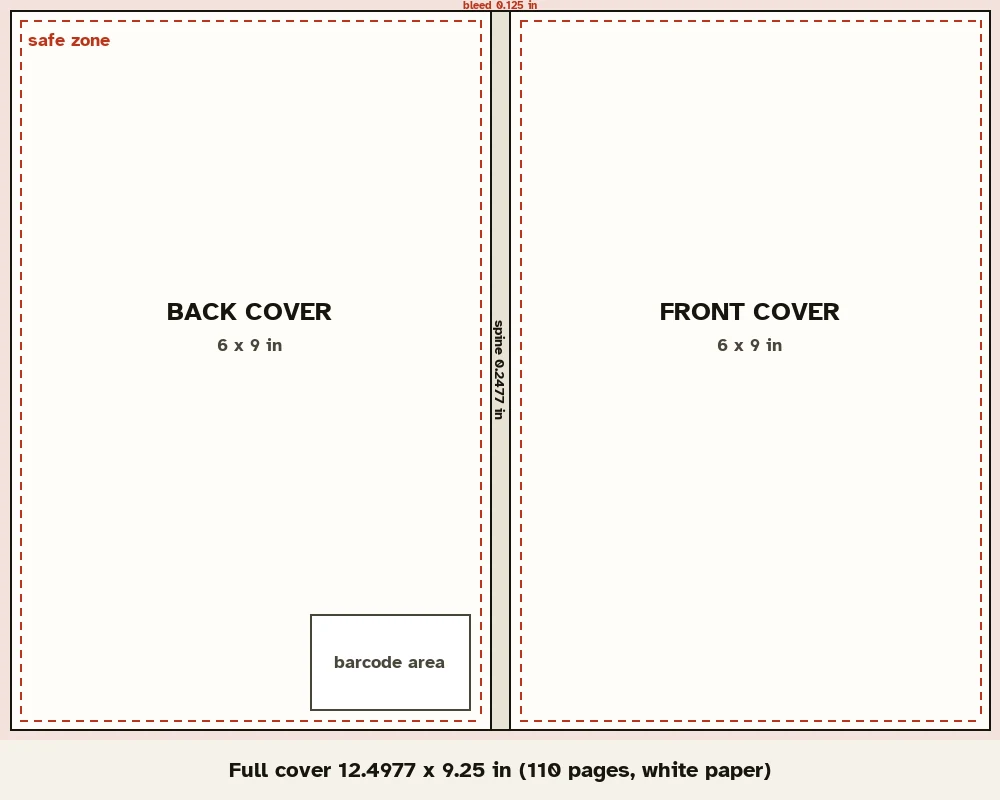
Safe zones, spine text and the barcode
- Keep all text at least 0.125 in inside the trim lines, which is 0.25 in from the outer edge of the cover file.
- Spine text needs at least 0.0625 in of space on each side, and KDP allows 0.0625 in of variance at each fold. On a quarter-inch spine that leaves very little room, so many thin puzzle books leave the spine plain.
- KDP prints a barcode on the back cover, lower right. For books without an ISBN, KDP documents a 2 x 1.2 in box. Keep that area free of text; KDP's cover template shows the exact spot for your book.
- Export the cover as a PDF at 300 DPI or more, with fonts embedded and no crop marks.
Do it in one step
The free spine width and cover size calculator does all three steps, draws the layout to scale and lets you download it as an SVG guide for your design program. For the final file, also download KDP's template from its cover calculator, which matches your exact trim, page count and paper.
If the page count changes
Added a bonus section or more puzzles? The spine changes, so the cover has to be redone. KDP also treats a manuscript change of more than 10% of the page count on a published book as a reason for a new edition. That is why it pays to fix the number of puzzles first and design the cover last.
Questions
What is the spine width of a 100-page book on KDP?
0.2252 in on white paper and 0.25 in on cream paper, using KDP's per-page figures.
Does a puzzle book need spine text?
No. It is optional, and KDP only prints it on books of about 80 pages or more. Thin books often look better with a plain spine in the cover colour.
What resolution should a KDP cover be?
At least 300 DPI. A 12.5 x 9.25 in cover at 300 DPI is about 3750 x 2775 pixels.
Does Gridbinder make covers?
No. Gridbinder makes the interior PDF and tells you its page count. Use KDP Cover Creator or a design program for the cover.
Sources
- KDP: Create a paperback cover, checked 29 October 2026
- KDP: Paperback submission guidelines, checked 29 October 2026
- KDP: Low-content books (barcode box without ISBN), checked 29 October 2026
- KDP: Book titles and editions (page count changes of more than 10%), checked 29 October 2026
KDP changes its rules from time to time. If a number here and the KDP help page disagree, the KDP page wins; please tell us at support@arling.sk.