 Gridbinder
Guide · E-ink and Etsy
Puzzle books for Kindle Scribe
Kindle Scribe owners can write on PDFs with the pen, which makes a puzzle PDF a real book for them. Making one is easy; making one that is pleasant to use takes a few decisions about page shape and navigation.
Updated 29 October 2026 · Examples are real, unedited pages from the Gridbinder studio unless the caption says otherwise.
How a PDF gets onto the Scribe
Amazon's help pages describe writing directly on PDFs sent with Send to Kindle, on the Kindle Scribe and on supported Android and iOS devices with a stylus. They also say PDFs loaded over USB, or sent before 11 November 2022, do not support handwriting and need to be sent again. Send to Kindle accepts files up to 200 MB.
Put this in your listing and in the PDF itself: buyers who drag the file over USB and cannot write on it will think the book is broken. Amazon updates these help pages, so check the current wording before you quote it to buyers.
Shape the page like the screen
A US Letter print PDF on a Kindle Scribe shows with grey bands and a smaller grid, because the page shape does not match the screen. The Scribe, reMarkable 2, Boox Note Air and Supernote A5 X all have screens close to 3:4. A page of 6.2 x 8.27 in has that shape and fills the screen.
One puzzle per page, a large grid, and room under it for working is what makes the PDF pleasant to write in.
Navigation: the part print books do not have
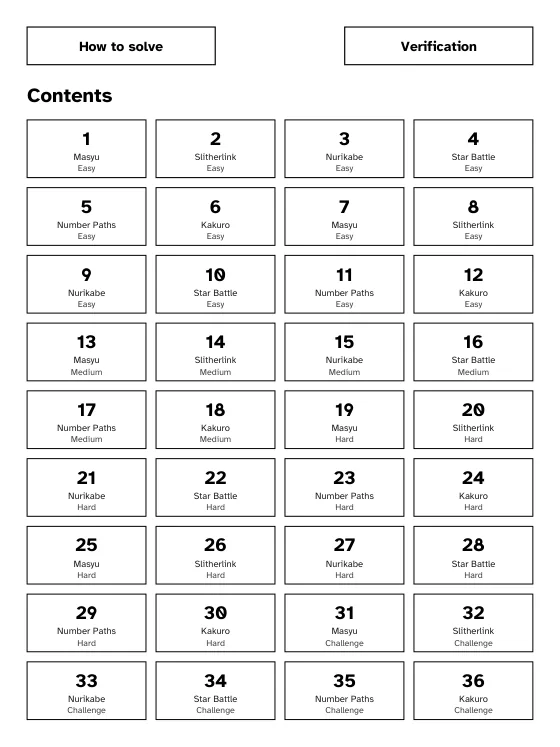
A 100-puzzle e-ink PDF made in the studio has 209 pages in our test, too many to page through on an e-ink screen. Tap links fix it:
- A contents page with a tile for each puzzle number that jumps to the puzzle.
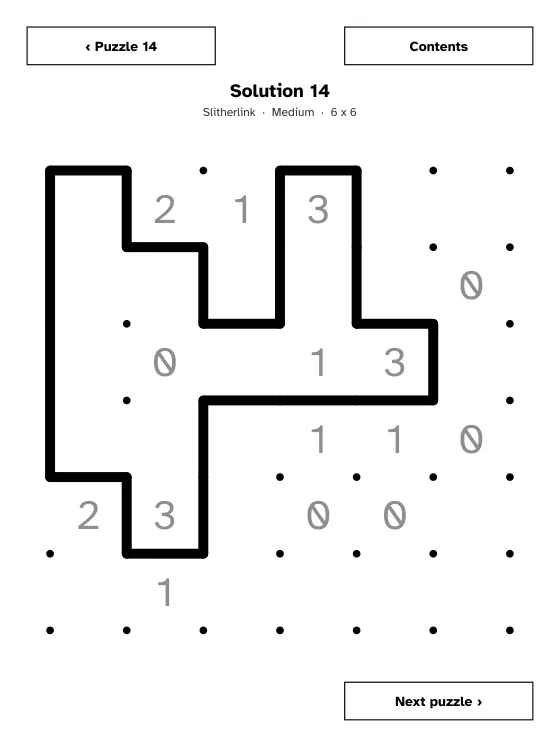
- On every puzzle page, a button to its solution and a button back to the contents.
- On every solution page, a button back to the puzzle, and "next puzzle".
- Links inside the document only. They are standard PDF link annotations; check them on your own device before you sell.
Where to sell a Kindle Scribe puzzle book
The Kindle Store has a write-on category, and KDP Community threads from publishers asking how to make write-on books for the Scribe did not find a way to publish them through KDP. We found no official KDP route for self-publishers either. So the PDF is sold directly: on Etsy as a digital download, on Gumroad or Payhip, or on your own site. See selling printable puzzle books on Etsy.
In the listing, say which devices the PDF was laid out for, that it is a PDF, how to send it with Send to Kindle, and that the links work inside the document.
In Gridbinder
Choose Edition: E-ink in the studio and the Kindle Scribe preset. You get a 6.2 x 8.27 in PDF with title, contents tiles, how-to pages, one puzzle per page, solutions and the Verification report, with tap links between them. The presets for reMarkable, Boox and Supernote differ only in the room left for each device's toolbar. We checked every link in the PDF file; we have not tested on every device, so try the free e-ink sample on yours first.
Questions
Can I write on a PDF on the Kindle Scribe?
Yes, when the PDF is sent with Send to Kindle. Amazon says PDFs copied over USB do not support handwriting.
Can I publish a Kindle Scribe write-on book through KDP?
We found no official KDP route for self-published write-on books, and forum threads from publishers asking about it did not find one. Sell the PDF directly instead.
What page size is best for Kindle Scribe?
A 3:4 page, such as 6.2 x 8.27 in, fills the screen. Letter-size print PDFs show smaller with empty bands.
Do links in a PDF work on the Kindle Scribe?
Internal links in a PDF are standard link annotations. Test the free sample on your own device before you sell, and tell buyers which devices you tested.
Sources
- Amazon: Write on PDF documents (Kindle Scribe help), checked 29 October 2026
- KDP Community: "Write on" books for Kindle Scribe, checked 29 October 2026
- KDP Community: Write-on Print Replica books for Kindle Scribe, checked 29 October 2026
- The eBook Reader: Crosswords and Sudoku puzzles for Kindle Scribe, checked 29 October 2026
KDP changes its rules from time to time. If a number here and the KDP help page disagree, the KDP page wins; please tell us at support@arling.sk.